

Enhance Collaboration with Nectain’s PDF Annotation Tool
Provide feedback, highlight important sections, and collaborate more effectively with your team.
Get a Demo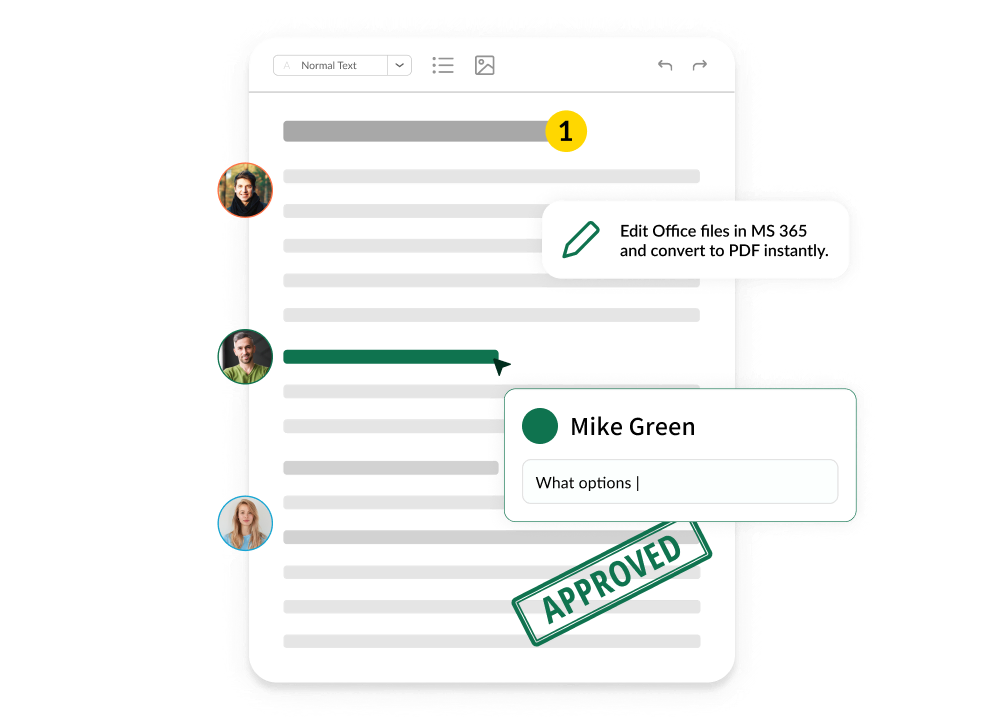
Make the Most of Your PDF Files

Convert Office to PDF
Nectain converts Office document formats into high quality PDFs.

Begin annotating
Once converted into PDF, the Nectain enables you to view, search, and annotate directly in the system. Opening or using Office isn’t necessary - you don’t even need to have Office at all!

Edit the files
If you need to edit the files, Nectain saves the original version in the Office format and, with the help of the built-in MS Office 365, you can conveniently edit the document and then convert the result back into PDF.
Here’s How Nectain’s Annotation Tool
Enhances Clarity and Efficiency
-

Annotation Features
Easily highlight text, add comments, draw shapes, put stamps, and insert notes directly on PDF documents. Annotating doesn’t affect the document’s electronic signing. Get the original version without annotations at the speed of a click.
-

Version Control
Control your PDFs to avoid confusion and errors. Save annotated versions of documents separately, ensuring original documents remain unchanged.
-

Export Options
Easily open PDF files you’ve annotated on using Nectain in a regular Acrobat Reader. You’ll see exactly the same content.
-

Searchable Annotations
Quickly find comments and highlighted versions with searchable annotations.
-

Watermarks
Apply watermarks with customizable text. Whether you’re working with drafts or confidential material, you can easily protect and share sensitive documents.
-

E-signature
Take advantage of the DocuSign integration to securely sign, send, and manage documents digitally without leaving the system.
