

Document Archiving Solutions in Nectain

Managing growing volumes of business documents is becoming increasingly challenging for organizations across every industry. To help companies improve performance, reduce system load, and ensure long-term compliance, Nectain introduces new powerful capabilities for document archiving solutions and archive document storage.
The updated functionality expands the Nectain Document archive system with new automation, access control, and flexible storage management features.
New “Archivist” System Role
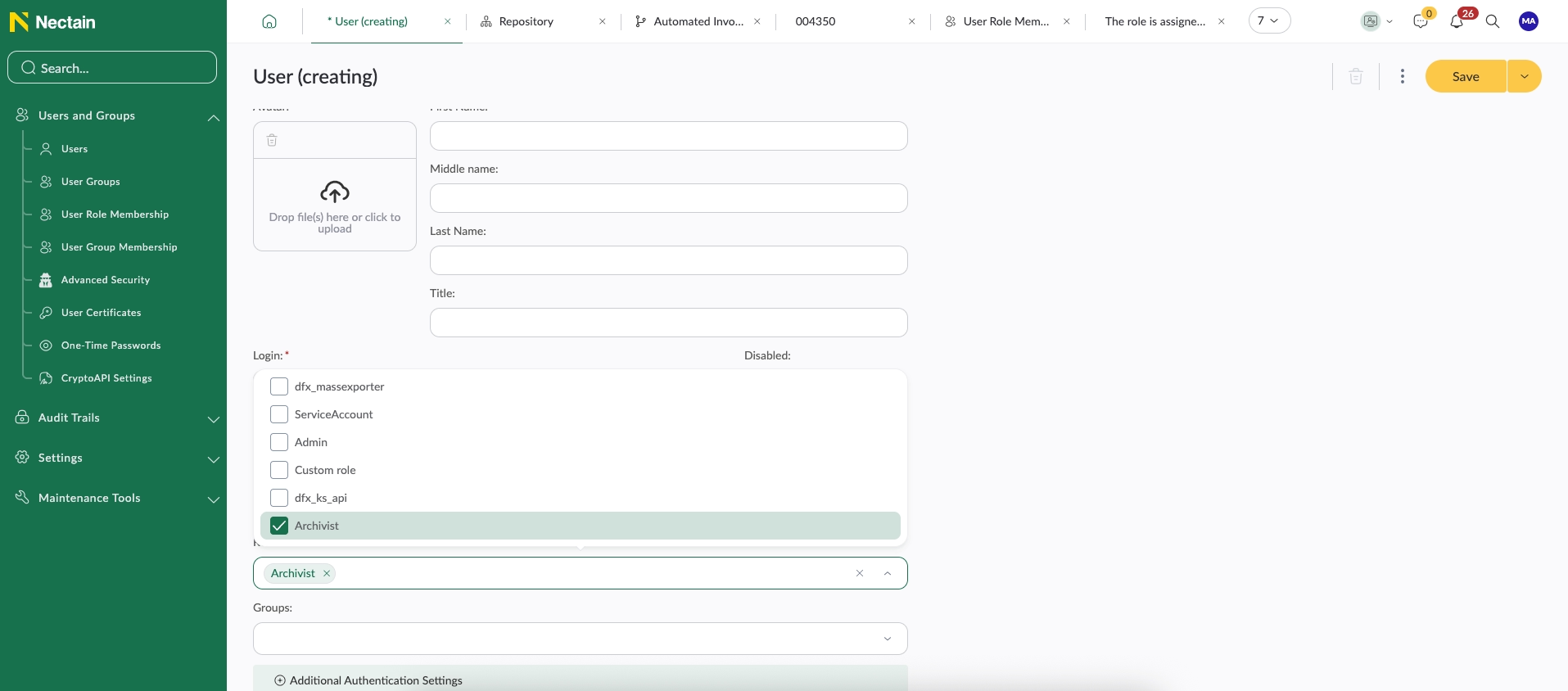
As part of the Archive Document module, Nectain now includes a dedicated system role called Archivist.
Users assigned to this role receive permissions to create and manage document archiving processes across the platform.
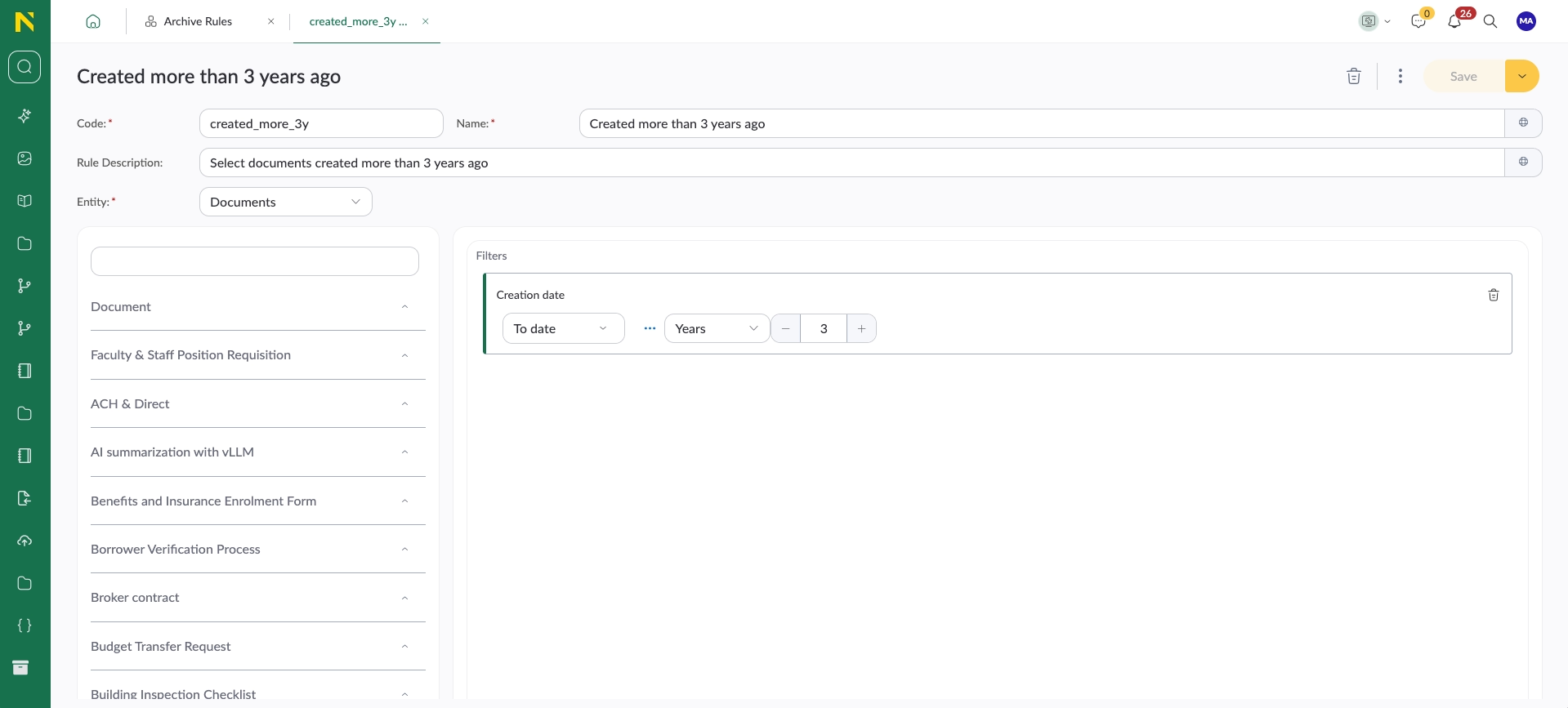
To simplify archive management, a dedicated shortcut is now available in Nectain Studio. Through this interface, the Archivist can configure flexible filters that determine which documents should be archived. Both standard and custom attributes are supported.
For example, organizations can configure rules to archive documents created more than three years ago.
Flexible Archive Rules for Different Document Types
For each document type, administrators can enable archiving rules in a dedicated Archiving tab.
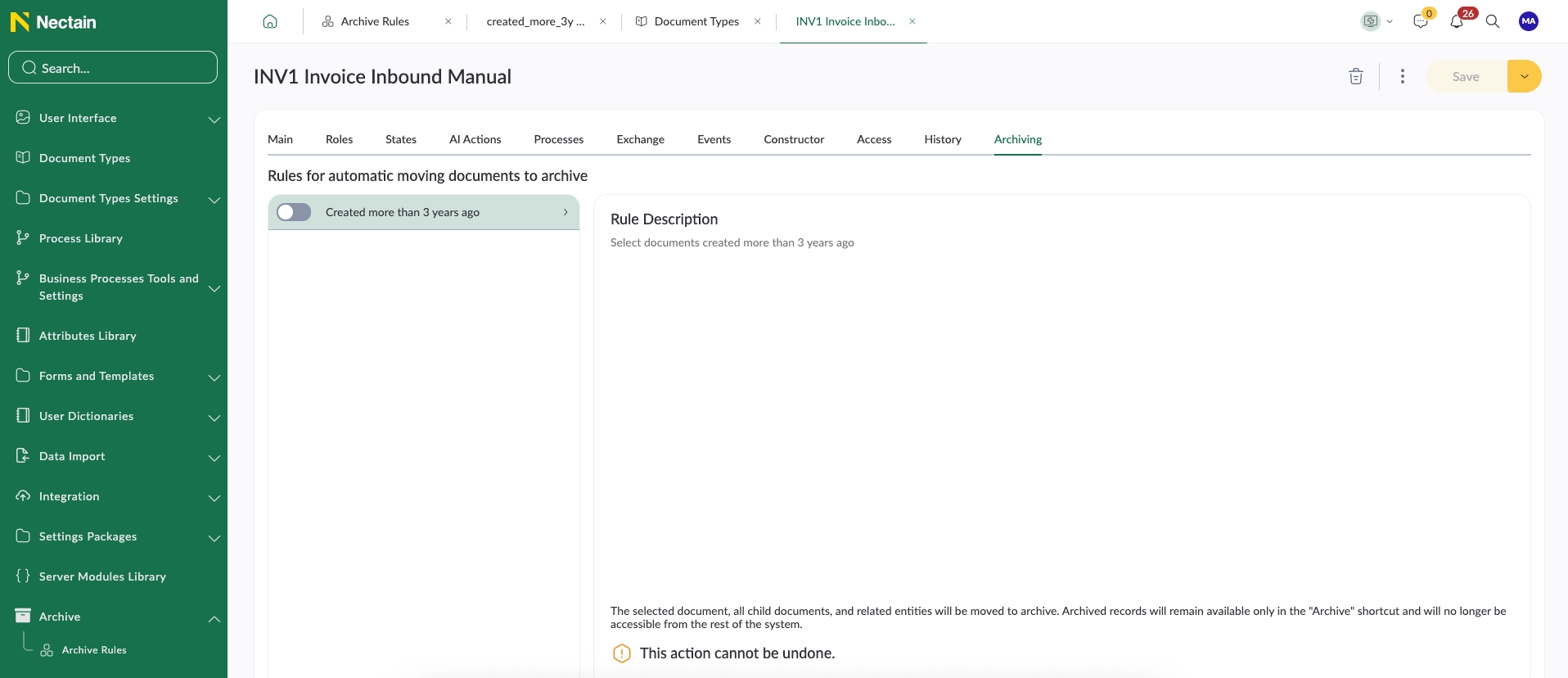
Once a retention rule is activated, the system can immediately start moving matching documents into the archive. Nectain automatically checks whether documents meet the configured criteria and transfers them to the archive.
Alternatively, organizations can rely on fully automated processing. Every night, the built-in scheduler automatically runs archive tasks and moves eligible documents into archive document storage.
This approach makes Nectain a scalable choice for companies looking for digital document archiving solutions with minimal manual effort.
Archive Documents Automatically Through Business Processes
Nectain also introduces a new event handler called Move to Archive.
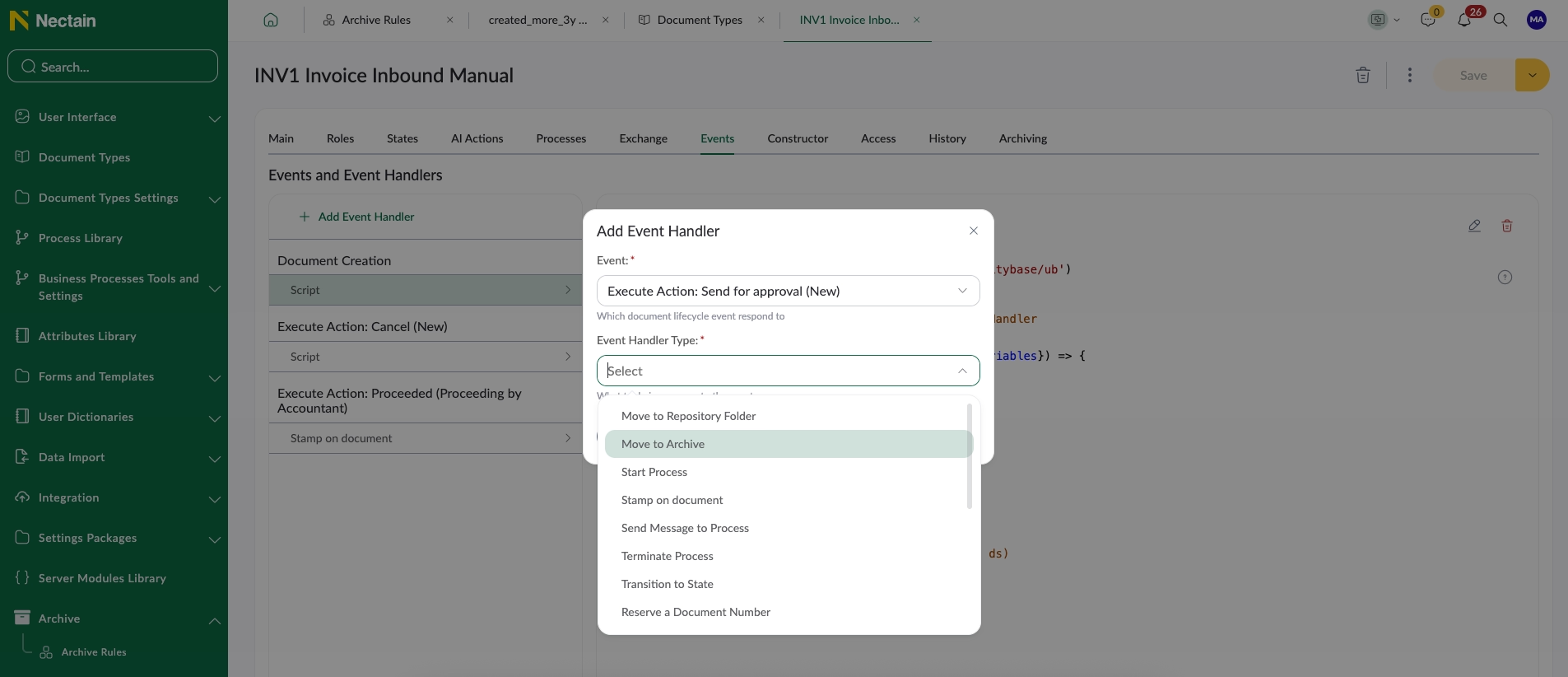
This functionality allows organizations to configure business logic for automatic archiving. For example, documents can be archived:
- after a workflow is completed
- when a document reaches the “Completed” status
- after process approval
- according to custom business rules
This gives companies more flexibility when implementing electronic document archiving solutions within complex workflows.
Manual Archive Actions in Document Repository
Archiving can also be launched directly from document-type shortcuts.
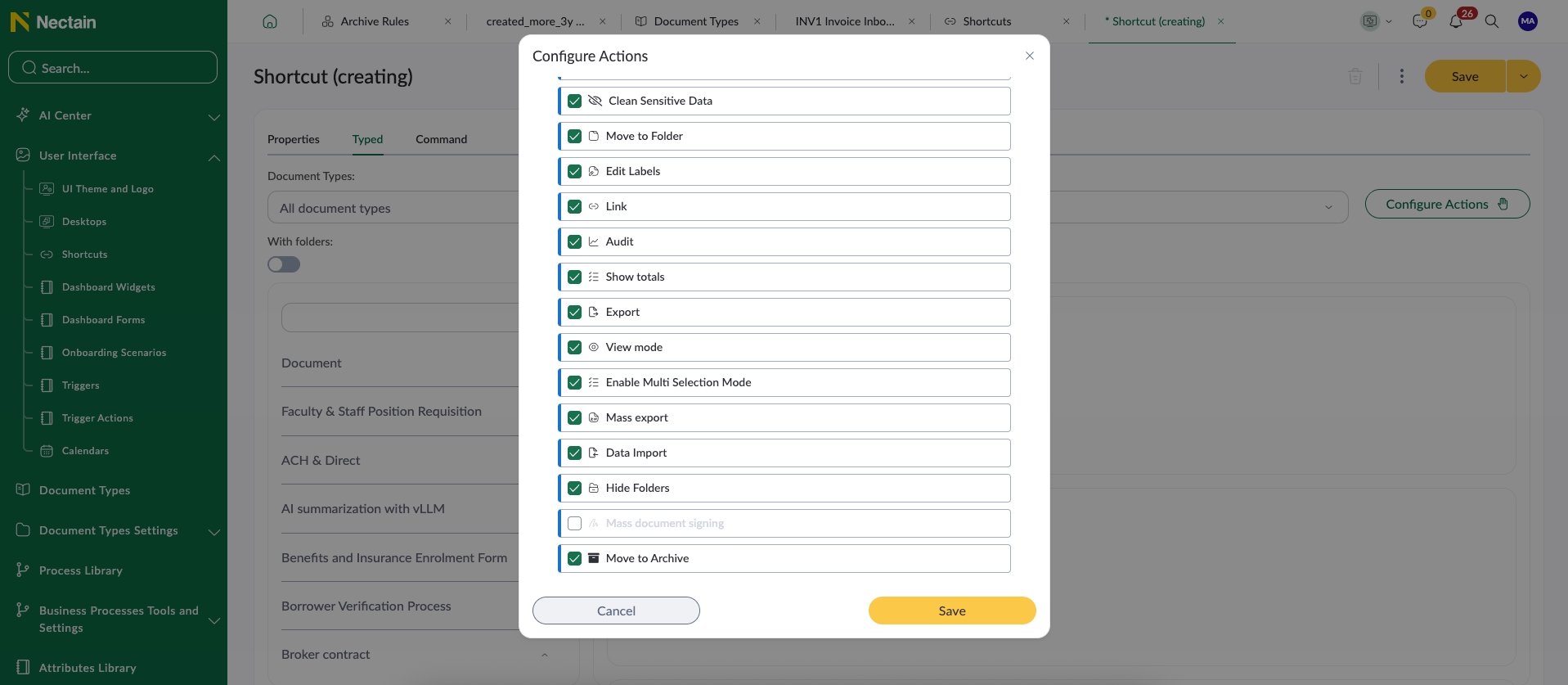
Administrators can configure a Move to Archive action that becomes available only for users with the Archivist role.
Archivists can select one or multiple documents directly from a repository and move them to the archive manually.
After the process starts, users receive a notification confirming that archiving has been initiated, including the number of processed documents.
Archived Documents in a Dedicated Workspace
Once archived, documents become available in a separate Archived Documents section visible only to Archivists.
If a document contains child documents, they will also be archived automatically. The system displays a warning before the process begins.
Archived documents are displayed in a simplified read-only format. Users can review all attributes while maintaining document integrity and security.
Additionally, a dedicated System Details tab provides access to:
- document history
- participant lists
- child documents
- processes
- tasks
- chats
- AI summaries
This makes the Nectain document archive system not only a storage tool, but also a centralized historical workspace for archived business information.
Controlled Access to Archived Documents
If necessary, the Archivist can grant access to archived documents to specific users directly from the archive document form by sharing a secure link.
This helps organizations maintain controlled collaboration while protecting sensitive archived data.
Separate Database Storage for Large Archives
One of the most important additions is the ability to store archived documents in a separate database.
This is especially valuable for organizations managing large volumes of documents. Separating archive document storage from active operational data helps reduce system load and improves performance when working with document repository.
For enterprises searching for scalable document archive solutions, this functionality provides better long-term performance and infrastructure optimization.
Want to see how Nectain automates archive document storage, retention policies, and document archiving workflows in real business environments?
Schedule a short personalized demo and discover how Nectain helps organizations simplify compliance, reduce system load, and manage archived documents more efficiently.
Document archiving solutions help organizations securely store, manage, and retrieve inactive or historical business documents while reducing the load on operational systems. Nectain provides scalable digital document archiving solutions with automated retention policies and archive workflows.
Yes. Nectain allows archived documents to be stored in a separate database. This functionality is especially important for organizations with high document volumes because it improves performance and reduces the load on active document repository.
Yes. Archived documents remain available in a dedicated “Archived Documents” workspace accessible to authorized users such as Archivists. Users can review document history, tasks, chats, AI summaries, and related processes in read-only mode.
Nectain allows organizations to configure archive document storage rules based on standard or custom document attributes. For example, documents older than three years can be automatically moved into the archive through scheduled or event-driven processes.
Yes. Nectain supports automated document archiving solutions through built-in schedulers and workflow event handlers. Documents can be archived automatically after process completion, approval, or status changes.
Electronic document archiving solutions are systems that digitally store business documents while preserving document history, metadata, workflows, and audit information. Nectain helps organizations archive document workflows securely while maintaining visibility and compliance.
Digital document archiving solutions are used to improve system performance, reduce operational data load, support compliance requirements, and securely store business records for long-term retention.
Nectain includes a dedicated Archivist system role. Users with this role can configure archiving filters, launch archive processes, manage archived records, and share access to archived documents when necessary.
Unlike traditional archive platforms that only store files, Nectain combines archive document storage with workflow automation, AI-powered document management, advanced search, and business process orchestration.
Nectain allows organizations not only to archive documents, but also to preserve document history, workflows, tasks, chats, AI summaries, and audit trails in one centralized environment.
Yes. Nectain is designed for organizations that require scalable and secure document archiving solutions across large document volumes and complex workflows.
The platform supports cloud, hybrid, and on-premises deployments and is suitable for industries with strict compliance and audit requirements.
- New “Archivist” System Role
- Flexible Archive Rules for Different Document Types
- Archive Documents Automatically Through Business Processes
- Manual Archive Actions in Document Repository
- Archived Documents in a Dedicated Workspace
- Controlled Access to Archived Documents
- Separate Database Storage for Large Archives
Related Posts

Who really owns your product: AI makes irresponsibility cheaper upfront — and more expensive later


Keep it Undefined, and You Never Have to Prove You’ve Built It
Get Updates and Insights Straight to Your Inbox
Stay up to date with the latest news, announcements, and articles.