

Automate Email Processing in Nectain

Email remains one of the most important channels for receiving business documents. Invoices, contracts, applications, requests, claims, onboarding files, and approvals still arrive in inboxes every day. But manually downloading attachments, forwarding emails, launching workflows, and entering data into systems slows teams down and creates unnecessary risks.
With the latest email automation capabilities in Nectain, organizations can now automate email processing and turn incoming emails into fully structured document workflows.
What Is Email Integration?
Email integration connects your mailboxes directly to your document management and workflow platform. Instead of treating email as a separate communication channel, the system automatically processes incoming messages, extracts attachments and data, launches workflows, and routes information to the right teams.
Modern email integration eliminates repetitive manual work such as:
- downloading attachments,
- forwarding emails,
- creating tasks manually,
- entering metadata,
- sorting documents by folders,
- triggering business processes by hand.
With Nectain, email becomes part of your intelligent document ecosystem.
Why Automate Email Document Processing?
Organizations receive hundreds or even thousands of document-related emails every week. Manual handling creates bottlenecks, delays approvals, and increases the risk of lost information.
Many organizations are looking for ways to automate email document processing without adding more manual work or disconnected tools.
The most effective approach is to combine:
- email integration,
- workflow automation,
- AI-powered document recognition,
- and intelligent document processing (IDP)
into a single automated workflow ecosystem.
Nectain helps organizations:
- automate email processing,
- automatically launch workflows,
- process email attachments,
- classify incoming documents,
- recognize document data with AI,
- and reduce manual operations across departments.
This approach is especially valuable for:
- Accounts Payable,
- HR onboarding,
- customer service,
- procurement,
- legal operations,
- and compliance-heavy industries.
What Does Email Integration in Nectain Software Do?
Nectain allows users to create email processing rules directly from the interface using connected email accounts as sources.
Users can configure email handlers that automatically trigger actions and business workflows based on incoming emails.
The platform supports multiple automation scenarios.
1. “Start Process” Email Handler
The “Start Process” handler automatically launches workflows when a new email is received.
Admins can create processing rules that use variables extracted directly from the email itself.
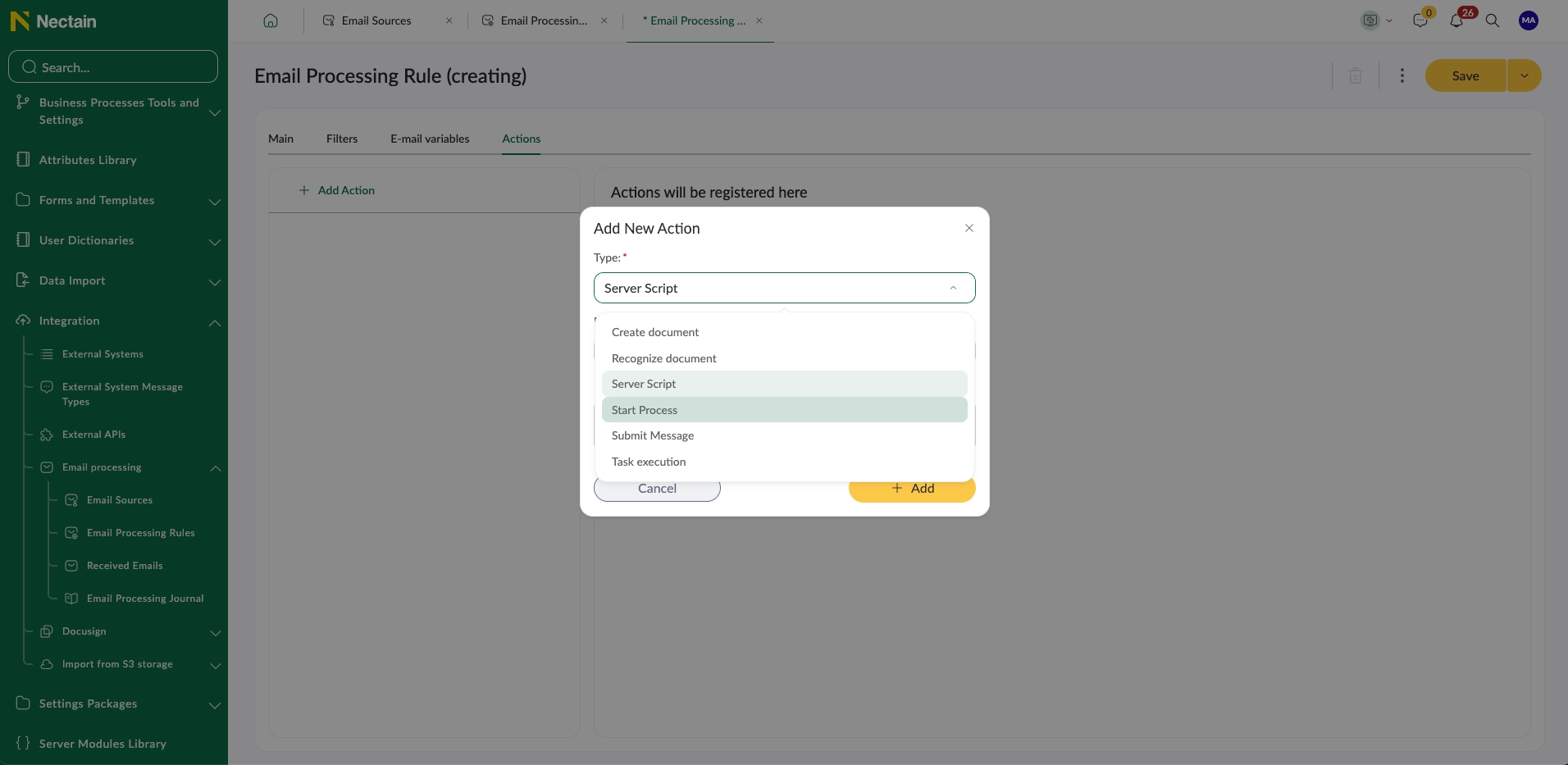
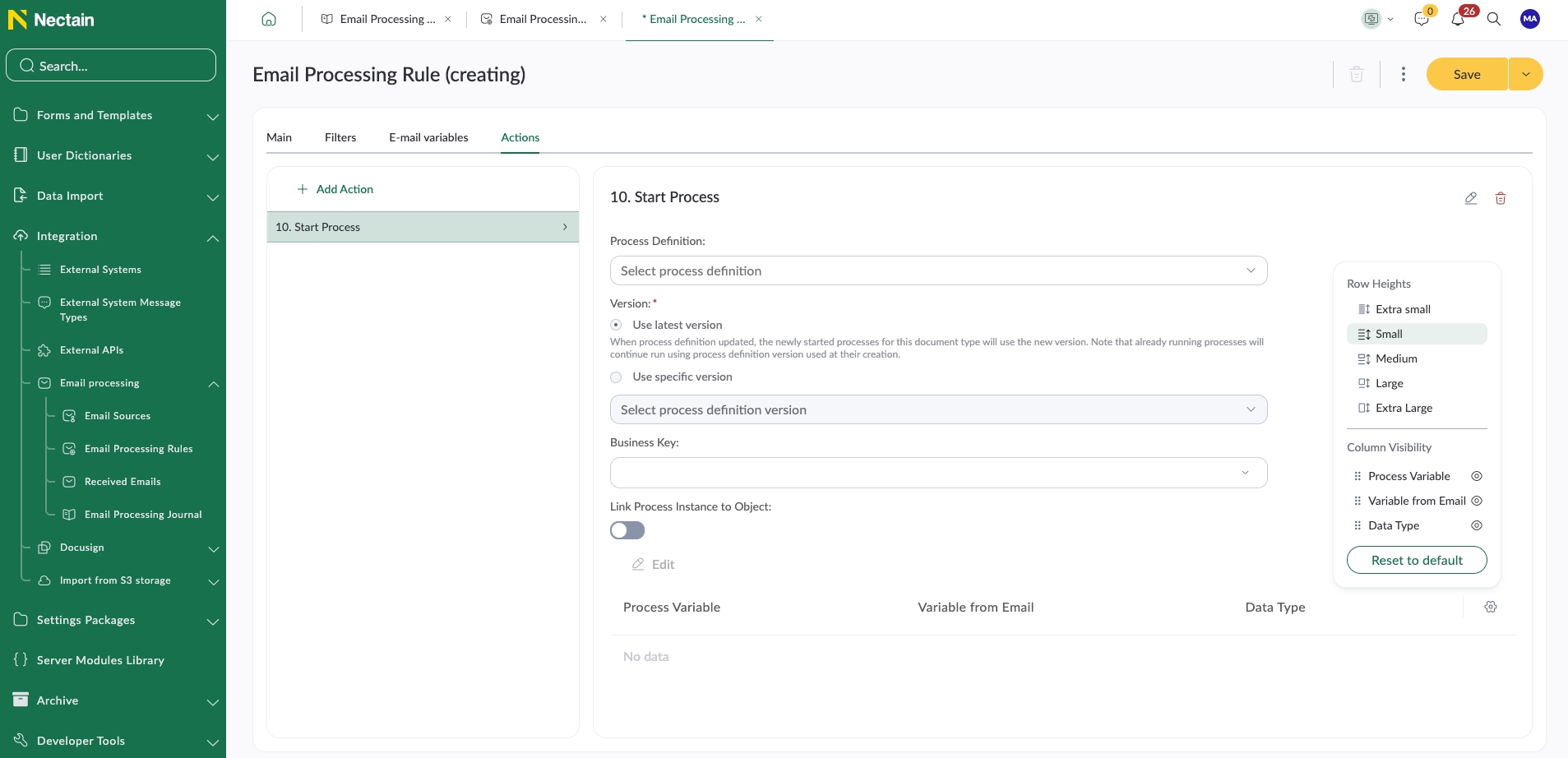
Nectain includes a flexible variable builder that allows organizations to extract:
- text values,
- numbers,
- metadata,
- and other email content.
These extracted variables can then be passed directly into workflows and business processes.
For example:
- an invoice email can automatically launch an approval workflow,
- a supplier request can create a procurement process,
- or a customer email can open a service case automatically.
2. “Send Message to Process” Handler
Some workflows are designed to wait for incoming messages or events. With the “Send Message to Process” handler, organizations can automatically continue or trigger these workflows when specific emails arrive.
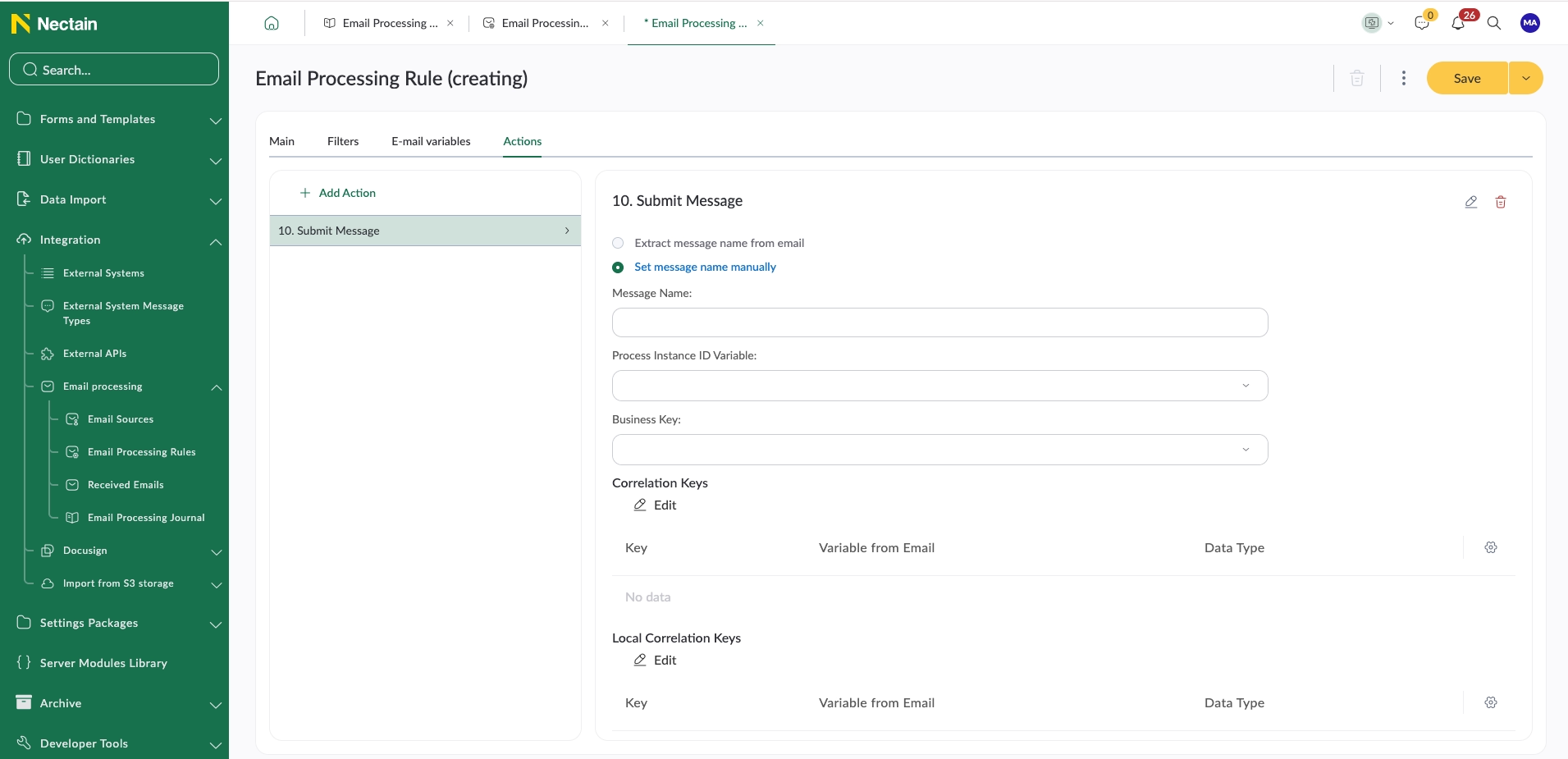
Users can:
- define a message code manually,
- select variables contained in the email,
- configure correlation logic using email variables,
- and pass additional variables directly into the running process.
This enables advanced workflow orchestration based on real-time email communication.
Typical use cases include:
- approval confirmations,
- workflow responses,
- customer replies,
- automated status updates,
- and event-driven process continuation.
3. “Recognize Document” Handler
The “Recognize Document” handler combines email integration with AI-powered document recognition.
Users can select a recognition template such as:
- AI Recognition,
- Intelligent Document Processing (IDP),
- or document splitting scenarios.
The system can automatically:
- extract attachments from emails,
- recognize document data,
- classify documents,
- and create documents in the system.
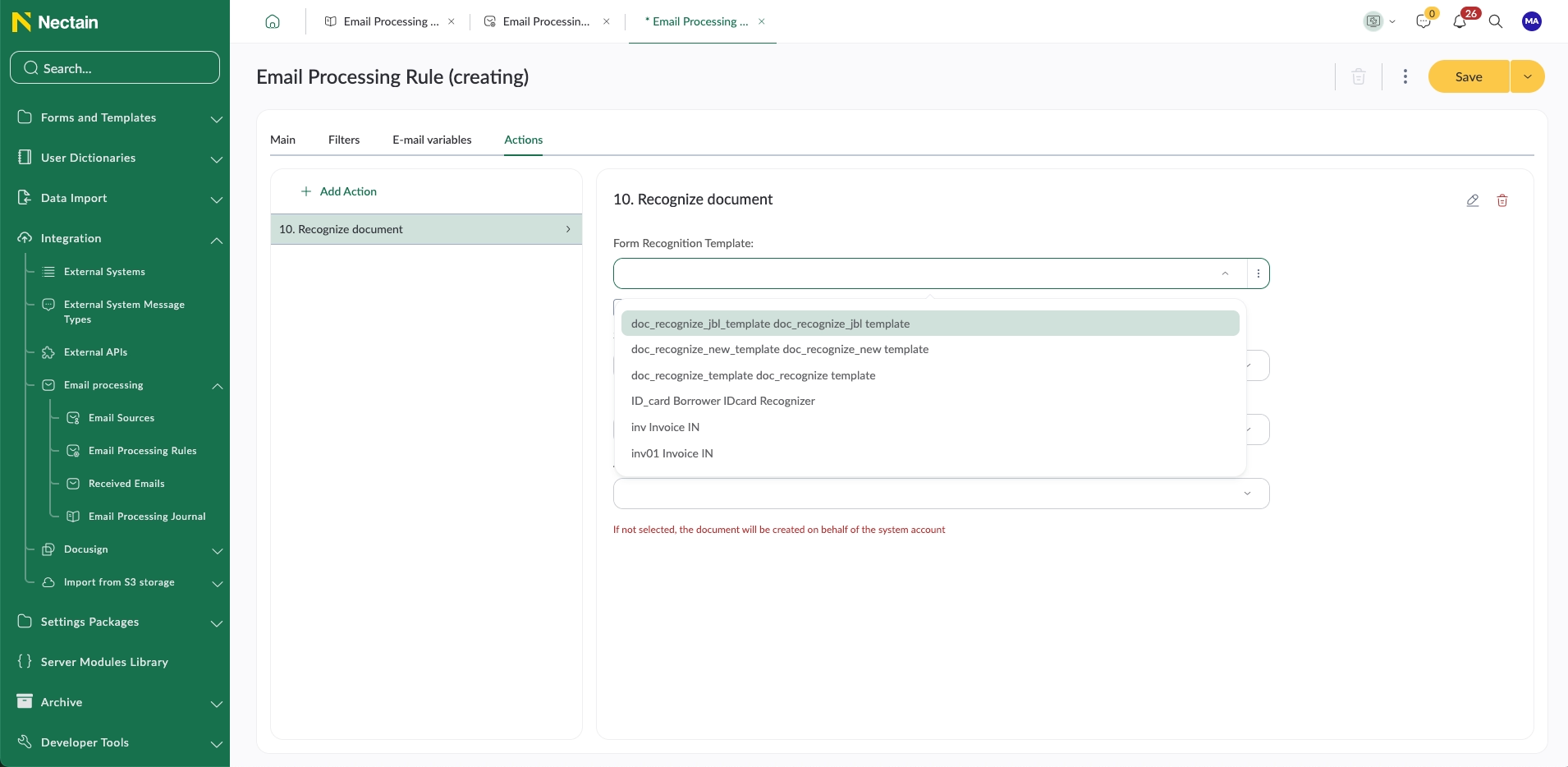
Users define the file source using variables of the “file” type.
For example, an organization can configure a variable named “attach” that searches incoming emails for:
- DOC,
- DOCX,
- PDF,
- PNG,
- JPG,
- and JPEG files.
If the option “multiple values allowed” is enabled, Nectain will process all email attachments automatically.
The platform can then create a single bulk recognition task where multiple files are recognized together in one automated operation.
This capability works similarly to power automate email attachment processing, but directly inside the Nectain intelligent document workflow platform — with built-in AI recognition, workflow automation, and document management.
Typical Business Use Cases
Accounts Payable Automation
Invoices arriving by email are automatically recognized, validated, and routed for approval.
HR Automation
CVs, onboarding forms, and employee documents are automatically processed and assigned to HR workflows.
Contract Processing
Contracts received by email are classified, recognized, and routed for review and approval.
Customer Service
Incoming customer requests automatically create service workflows and tasks.
Compliance & Archiving
All inbound communication and attachments become searchable, traceable, and audit-ready.
From Inbox to Intelligent Workflow
Nectain transforms email from a manual communication channel into an intelligent automation layer for documents and business processes.
By combining:
- email integration,
- workflow automation,
- AI recognition,
- IDP,
- and document management,
organizations can significantly reduce manual work while improving speed, accuracy, and process visibility.
If you want to see how Nectain can automate email processing in your organization, schedule a short demo with our team and see the platform in action with real business scenarios.
Email integration in Nectain connects your mailboxes directly to document workflows and business processes. The platform can automatically process incoming emails, extract attachments, launch workflows, recognize documents with AI, and route information to the right teams.
To automate email document processing, organizations need:
- connected email accounts,
- email processing rules,
- workflow automation,
- and document recognition capabilities.
Nectain allows users to create email processing scenarios that automatically:
- monitor inboxes,
- process attachments,
- extract document data,
- create workflows,
- and route documents without manual intervention.
Yes. Nectain can automatically process email attachments such as:
- PDF,
- DOC,
- DOCX,
- PNG,
- JPG,
- and JPEG files.
The platform can extract attachments from incoming emails and launch AI-powered recognition or document workflows automatically.
Yes. Nectain combines email integration with AI-powered document recognition and Intelligent Document Processing (IDP).
Organizations can automatically:
- recognize invoices,
- classify contracts,
- extract document data,
- split document batches,
- and create documents directly from email attachments.
Yes. Nectain can automatically launch workflows when emails are received.
For example:
- invoices can trigger approval workflows,
- customer requests can create service cases,
- HR documents can launch onboarding processes,
- and contracts can start review workflows automatically.
Nectain supports flexible email processing rules based on:
- sender,
- recipient,
- subject,
- email text,
- attachment types,
- variables,
- and metadata.
Organizations can configure advanced workflow logic and process automation directly from the interface.
Yes. Nectain supports bulk attachment processing.
If multiple files are attached to an email, the platform can automatically process all attachments together and create a single bulk recognition task.
This is especially useful for:
- invoice batches,
- HR document packages,
- procurement files,
- and compliance submissions.
Nectain supports functionality similar to power automate email attachment processing, but combines it with:
- AI recognition,
- document management,
- workflow automation,
- audit-ready storage,
- and intelligent document processing capabilities in one platform.
Automated email processing is especially valuable for:
- Accounts Payable,
- HR,
- procurement,
- legal,
- customer service,
- compliance,
- and operations teams.
Any department handling large volumes of document-related emails can significantly reduce manual work with Nectain.
Yes. Nectain can automatically create documents, records, workflow tasks, and cases from incoming emails and attachments.
The system can also populate metadata fields and assign document types automatically.
Yes. Nectain is designed for security-critical and compliance-driven environments. The platform supports secure email integration, centralized document storage, audit trails, access control, and enterprise deployment options.
Related Posts

Who really owns your product: AI makes irresponsibility cheaper upfront — and more expensive later


Keep it Undefined, and You Never Have to Prove You’ve Built It
Get Updates and Insights Straight to Your Inbox
Stay up to date with the latest news, announcements, and articles.